Published September 28, 2026
Should I opt my business out of Google AI Overviews and AI Mode?
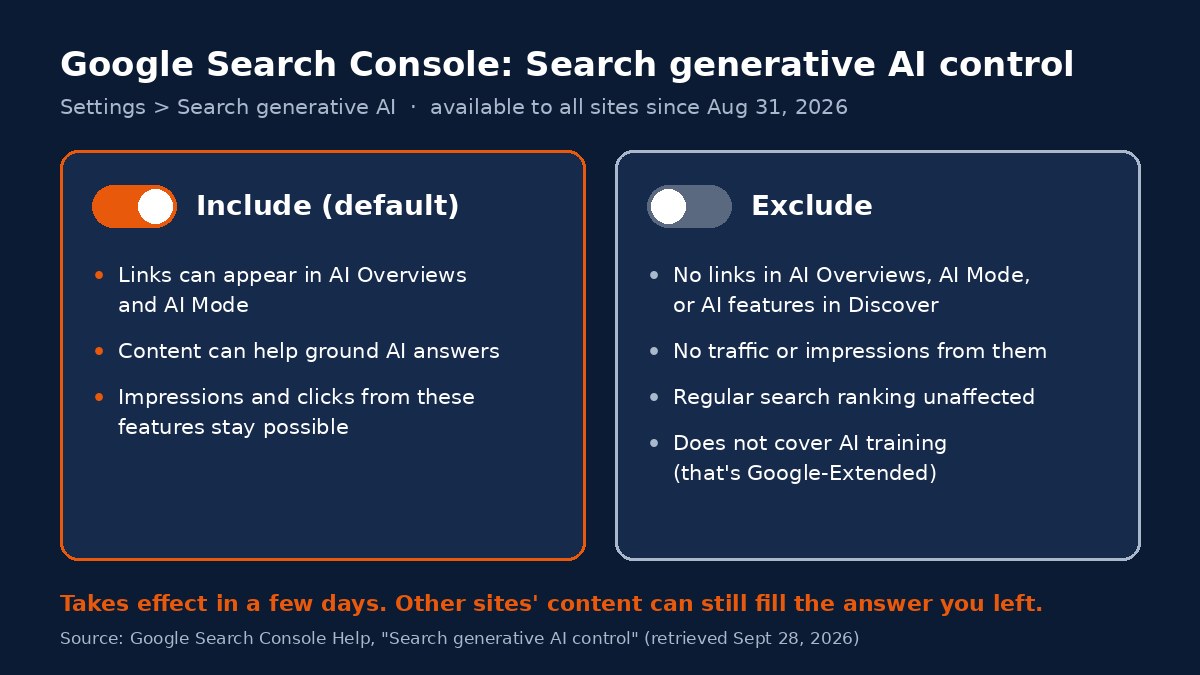
For most local and professional-service businesses, no. Since August 31, 2026, every site in Google Search Console has a setting that can remove its links and content from AI Overviews, AI Mode, and the AI features in Discover. Turning it off doesn't stop Google from answering questions about your field. It stops Google from citing you in that answer, and other sites fill the space. The setting makes sense for businesses whose content is the product. For a business that wants to be recommended, it usually works against the goal.
What this means
Google calls it the Search generative AI control. It sits in Search Console under Settings > Search generative AI, and it has three choices: include your site (the default), exclude your site, or inherit whatever a parent property has chosen (Search Console Help, n.d.). Google started testing the setting with a group of UK sites on June 3, 2026, and said on August 31, 2026 that it had rolled out to all websites worldwide (Loew, 2026; Schwartz, 2026).
If you exclude your site, Google says links to it won't appear in those AI features, your content won't be used as an input to generate AI responses there, and you won't get any traffic or impressions from them. Google also says plainly that content from other sites will still be available in those features, "and it may appear similar to yours" (Search Console Help, n.d.). The answer still gets written. Your business just isn't part of it.
Who this applies to
Anyone with a verified Search Console property, which means the decision is available to you whether or not you ever meant to make it. Two groups have a real reason to think about it. Publishers, course creators, and anyone who sells information directly may prefer that Google not summarize their work. Businesses that live on being found, like law firms, contractors, home services, accounting practices, real estate teams, and healthcare or aesthetics practices, are in the opposite position. For them, a citation in an AI answer is the point.
There's a third group worth naming: businesses that are excluded and don't know it. Search Console properties can be nested, and a child property inherits its parent's choice by default (Search Console Help, n.d.). If a previous web developer or agency changed the setting at the domain level, every section of your site follows it.
How we'd evaluate it
We start by checking what the setting is right now, and who set it. Then we look at what the business would give up. Google's generative AI performance report in Search Console shows how often your pages appeared in AI Overviews and AI Mode, and Google points site owners to that report to judge how a change would affect traffic (Search Console Help, n.d.). We cover what that report does and doesn't show in our post on AI Overviews data in Search Console.
The last question is what problem the owner is trying to solve. If it's "I don't want my content used to train AI," this setting is the wrong tool (more on that below). If it's "AI is saying something wrong about us," excluding your site removes your own accurate pages from the answer and leaves the wrong sources in place.
Available options
- Leave it on the default. Your links and content stay eligible for AI Overviews and AI Mode. This is what we recommend for most service businesses.
- Exclude the whole site. Google says content is excluded within one to two days after the change goes live, though caching can make some content take longer (Search Console Help, n.d.).
- Exclude one section. Because of the parent and child structure, a URL-prefix property such as a members-only resource library can carry its own setting while the rest of the site stays included.
- Use page-level snippet controls instead. Google's documentation lists
nosnippet,data-nosnippet,max-snippet, andnoindexas ways to limit what Search shows from a page (Google Search Central, 2025). These are narrower tools, andnosnippetandnoindexalso change how the page appears in regular results.
Benefits, limitations, and tradeoffs
The benefit is control. Site owners and publishers had asked for this kind of control since these features launched (Schwartz, 2026), and Google has said it is also engaging with regulators like the UK's Competition and Markets Authority on these tools (Loew, 2026).
The limitations are specific:
- It doesn't cover AI training. Google says this control doesn't affect training, and points to Google-Extended for that (Search Console Help, n.d.). Our post on blocking AI crawlers explains why training and search visibility are separate decisions.
- Your content can still be used elsewhere in Search. Google says excluded content may still help its systems understand the language of queries and pages (Search Console Help, n.d.).
- It isn't a ranking penalty, but it isn't free either. Google says the setting isn't used as a ranking signal for the rest of Search (Loew, 2026). What you lose is the AI placement itself, on queries where an AI Overview or AI Mode answer may be the first thing a customer reads.
What we know
Here's what the primary sources say, as of this post's date:
- Google reports that AI Overviews has over 2.5 billion monthly active users and AI Mode has passed one billion monthly users (Loew, 2026). Those are Google's own figures, not independent measurements.
- To be eligible as a supporting link in AI Overviews or AI Mode, a page must be indexed and eligible to show with a snippet. Google says there are no extra technical requirements (Google Search Central, 2025).
- Excluding a site removes it from AI Overviews, AI Mode, and generative AI features in Discover, and Google expects to update that list over time (Search Console Help, n.d.).
- Excluding does not override other programs a business takes part in, such as Merchant Center and Google Ads (Search Console Help, n.d.).
What hasn't been published is independent data on what happens to a local business's leads after opting out. We haven't seen any, so we won't guess at a number.
Next steps
Open Search Console, go to Settings > Search generative AI, and confirm the setting says what you expect for every property you own. If it says "Exclude" and nobody on your team chose that, find out who did before changing it back. If it's already on the default and you still aren't showing up, the setting isn't your problem. Our guide on how to show up in Google AI Overviews covers where to look next.
Orlando considerations
Central Florida customers already ask Google long, specific questions: which contractor handles storm damage repairs near them, which firm takes a certain kind of case, which practice is open on weekends. Those are the questions where AI Mode tends to give a written answer with a handful of links. A local business that excludes itself hands those links to competitors and directories. Local publishers and anyone selling information products have a different calculation, and for them the setting is a reasonable thing to weigh.
Frequently asked questions
Will opting out of AI Overviews hurt my regular Google rankings?
Google says the Search generative AI control is not used as a ranking signal for search results outside its generative AI features. You would lose traffic and impressions from AI Overviews, AI Mode, and AI features in Discover.
Does the setting stop Google from training AI on my website?
No. Google says this control does not affect AI training. To limit training of the models behind its AI features, Google points site owners to Google-Extended.
How long does it take for the change to work?
Google says content is generally excluded within one to two days after the change goes live, but some content can take longer because of caching across Google's systems.
How do I check whether my site is excluded?
In Google Search Console, open Settings, then Search generative AI. Check each property you own, because a child property follows its parent's setting by default.
References
Google Search Central. (2025, December 10). AI features and your website. Google for Developers. https://developers.google.com/search/docs/appearance/ai-features
Loew, M. (2026, June 3). New opportunities, control and insights for website owners (Updated August 31, 2026). The Keyword, Google. https://blog.google/products-and-platforms/products/search/new-controls-website-owners/
Schwartz, B. (2026, August 31). Google Search Console AI performance reports and Search generative AI control rolling out globally. Search Engine Land. https://searchengineland.com/google-search-console-ai-performance-reports-and-search-generative-ai-control-rolling-out-globally-486269
Search Console Help. (n.d.). Search generative AI control. Google. Retrieved September 28, 2026, from https://support.google.com/webmasters/answer/16908024?hl=en
Last updated: September 28, 2026
Not sure whether Google's AI is citing your business, or whether someone changed a setting you never saw? That's the kind of gap an AI visibility audit is built to find, with a prioritized list of what to fix first.