Published October 4, 2026
Does content hidden in tabs or accordions hurt my AI search visibility?
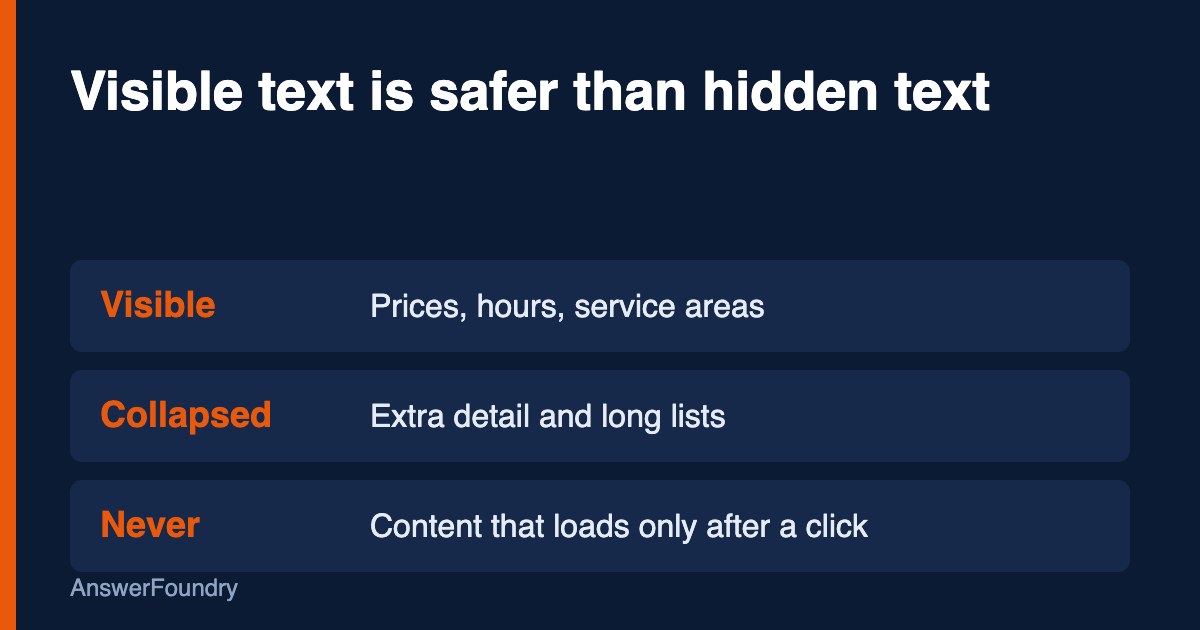
It can. Google says moving content into accordions or tabs is fine on mobile, as long as the content is in the page and does not wait for a click to load. Microsoft is more cautious and warns that AI systems may not render content hidden in tabs or expandable menus. Keep the facts customers ask about in visible text.
What this means
Tabs and accordions are layout tools that hide part of a page until a visitor clicks. They keep pages short, which helps on phones. The question is whether the machines reading your page see what is behind the click.
Google's mobile-first guidance says that instead of removing content from a mobile page, you can consider moving it into accordions or tabs. The same guidance warns that Google "won't load content that requires user interactions," so primary content should not be lazy-loaded behind a click (Google Search Central, 2025b).
Microsoft's guidance for AI search answers says AI systems may not render content hidden in tabs or expandable menus, so key details can be skipped (Madhavan, 2025). The two positions differ in tone, and the safe path satisfies both: keep important facts visible, and make sure anything collapsed is already in the page code.
Who this applies to
Any site that uses FAQ accordions, tabbed service descriptions, "read more" toggles, or mobile menus that tuck away content. Service businesses and clinics often put pricing, insurance, and service-area details in these.
How we'd evaluate it
We look at each key page with and without clicking, and check:
- Is the content in the page source? Text that is present in the HTML on load is different from text fetched only after a click.
- What is hidden? Prices, hours, and service areas should not be the collapsed parts.
- Does mobile match desktop? Google expects the same content on both (Google Search Central, 2025b).
- Is anything essential only in a tab? If a customer would ask it, it belongs in visible text.
Available options
- Open the essentials. Show prices, hours, service areas, and the main answer by default.
- Keep accordions for detail. Collapse secondary information, such as long policies, but keep it in the page code.
- Avoid click-to-load. Do not fetch primary content only after a tap or click.
- Test it. View the page with scripts off, or check how it renders in Search Console's URL Inspection tool.
Benefits, limitations, and tradeoffs
Showing more text makes pages longer. That is a real design cost, especially on mobile. The tradeoff is worth making for the handful of facts that decide whether someone calls you, and not worth making for every secondary detail.
What we know
Google's documentation supports accordions and tabs as a mobile layout choice, with content that does not rely on user interaction to load (Google Search Central, 2025b). Google's AI features documentation says important content should be available in textual form (Google Search Central, 2025a). Microsoft says AI systems may skip content hidden in tabs or expandable menus (Madhavan, 2025).
What we don't know: how each AI product handles collapsed text that is present in the page code. The sources describe the risk and the safe practice, not test results for every tool.
Next steps
Pick your top five pages and list what is hidden on each. Move prices, hours, service areas, and direct answers into visible text. Leave long detail in accordions if you like, and confirm that it is part of the page code from the start.
Orlando considerations
Many Orlando businesses get most of their traffic from phones, including visitors searching on the go. A clean mobile layout matters, so use accordions for secondary detail and keep the facts a visitor needs, like hours, parking, and service area, in view.
Frequently asked questions
Are accordions bad for SEO?
Not by themselves. Google's mobile-first guidance suggests accordions or tabs as an option for mobile layouts. The problem is content that loads only after a click, which Google says it will not load.
Should my FAQ be an accordion?
It can be. Keep the question text visible and the answer in the page code. For your most important answers, consider showing them open by default.
Does this apply to ChatGPT too?
We have not seen a platform document how it handles collapsed text. Microsoft's guidance is the clearest statement, and it advises caution.
How do I check what a crawler sees?
Use the URL Inspection tool in Google Search Console to view the rendered page, and compare it with what you see in a browser.
References
Google Search Central. (2025a, December 10). AI features and your website. Google for Developers. https://developers.google.com/search/docs/appearance/ai-features
Google Search Central. (2025b, December 10). Mobile-first indexing best practices. Google for Developers. https://developers.google.com/search/docs/crawling-indexing/mobile/mobile-sites-mobile-first-indexing
Madhavan, K. (2025, October 8). Optimizing your content for inclusion in AI search answers. Microsoft Advertising. https://about.ads.microsoft.com/en/blog/post/october-2025/optimizing-your-content-for-inclusion-in-ai-search-answers
Last updated: October 4, 2026
If you want to know how AI tools describe your business today, and whether your site is getting in the way, an AI visibility audit maps it and gives you a prioritized list of what to fix first.