Published August 30, 2026
Can AI search engines read my website if it's built with JavaScript?
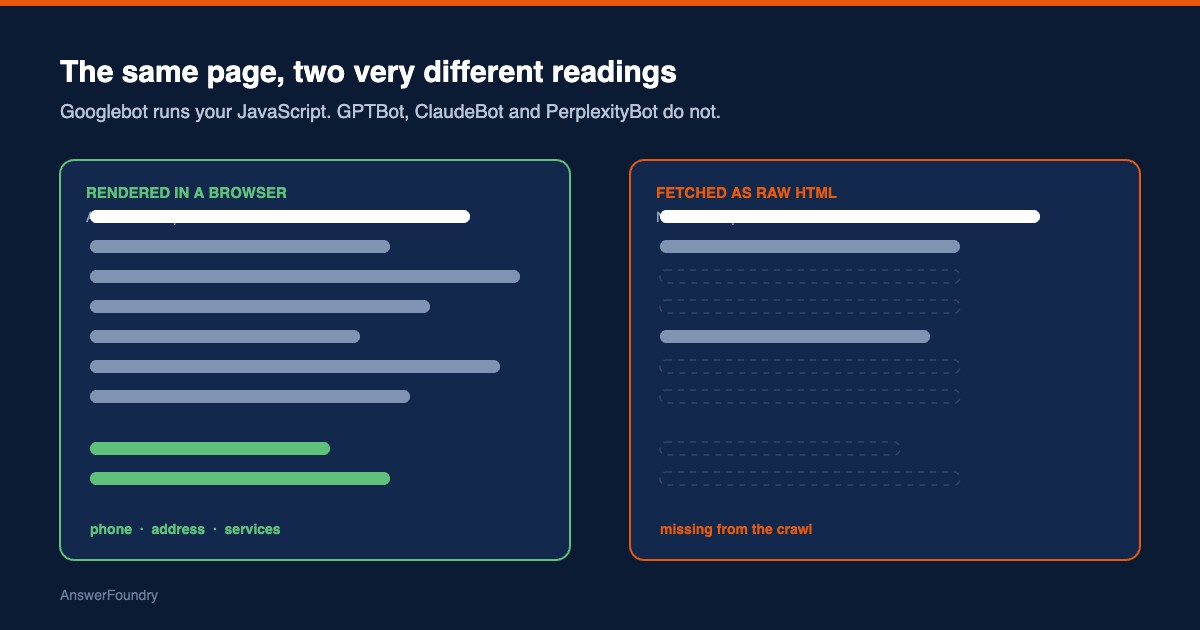
Mostly, no. Google runs your JavaScript before it indexes your page. The major AI crawlers do not — they fetch the raw HTML your server sends and read whatever is already in it. If your phone number, your services list, or your main body copy only appears after a script runs, ChatGPT, Claude, and Perplexity are working from a page that never contained it.
What this means
Every web page arrives in two stages. First your server sends a file of HTML. Then your browser runs whatever JavaScript that file points to, and the script fills in the rest — a services grid, a booking widget, a location block, sometimes the entire body of the page. What you see on screen is stage two. What a crawler sees depends entirely on whether it bothers to run stage two.
Googlebot does. Google Search renders pages with an evergreen version of Chromium, queues every page that returns a 200 status code for rendering, and indexes the rendered result (Google Search Central, 2026). The AI crawlers behave differently. A joint analysis by Vercel and MERJ across their network found that none of the major AI crawlers render JavaScript, including OpenAI's GPTBot, OAI-SearchBot, and ChatGPT-User, Anthropic's ClaudeBot, PerplexityBot, Meta's crawler, and ByteDance's Bytespider (Zecchini et al., 2024). They do download JavaScript files — ChatGPT in 11.50% of requests, Claude in 23.84% — but they never execute them.
Who this applies to
Any site built as a single-page app, or built on a framework that ships an empty shell and fills it in client-side, is exposed. So is any conventional site that loads one important piece client-side — a chat widget that holds the phone number, a JavaScript-injected address block, a tabbed services section, a reviews carousel pulled in from a third party. You do not need a fully client-rendered site to have a problem. You need one answer-critical element that only exists after a script runs.
Sites that are entirely server-rendered — most WordPress installs, most static sites, most hosted builders that publish flat HTML — are largely unaffected, though third-party widgets can still punch a hole in an otherwise fine page.
How we'd evaluate it
The check is mechanical. Fetch the page twice: once in a headless browser with JavaScript running, once as a plain HTTP request with no JavaScript at all, then compare what is present in each. The second fetch approximates what a non-rendering crawler receives. Anything that appears in the first and not the second is content the AI engines cannot see on a direct crawl.
You can do a rough version yourself in about a minute. Open your homepage in Chrome and choose View Page Source, not Inspect. View Page Source shows the raw HTML your server sent. Search it for your phone number, your street address, your headline, and a sentence from the middle of your main copy. If those strings are missing, they were injected by JavaScript.
Available options
- Move the specific elements server-side. Usually the smallest fix. The phone number, address, headings, body copy, navigation links, and JSON-LD structured data need to exist in the HTML your server sends, not be written in later.
- Pre-render or server-render the whole page. Appropriate when the site is a genuine single-page app and the gap is not confined to a few elements.
- Keep JavaScript for enhancement only. Interactive maps, live chat, filters, and animations are fine as client-side features, as long as nothing an AI engine needs to describe your business lives exclusively inside them.
Benefits, limitations, and tradeoffs
The benefit of fixing this is unusually concrete for AI visibility work: it moves content from invisible to visible on a direct crawl, and you can verify the fix the same way you found the problem. It also helps human visitors and traditional search, since server-rendered pages load faster.
The limitation is that this is necessary, not sufficient. Being readable does not mean being cited. An engine still has to decide your business is worth naming, and that depends on corroboration across your listings, reviews, and third-party mentions — none of which a rendering fix touches. There is also a real cost: on a framework-heavy site, moving to server rendering is development work, and on a small brochure site it may be wildly disproportionate to the two elements actually at risk. Fix the elements first and measure before rebuilding anything.
What we know
The Vercel and MERJ dataset is the clearest evidence available, and it is large — GPTBot generated 569 million requests across Vercel's network in the month studied, and ClaudeBot 370 million, together roughly 20% of Googlebot's 4.5 billion (Zecchini et al., 2024). Their conclusion was consistent across both Next.js and non-Next.js stacks: content included in the initial HTML response may be indexed; client-rendered content cannot be.
How often this actually bites small businesses is less settled. A 2026 preprint captured 405 North American small-business and B2B sites twice each — once rendered, once as a raw GPTBot-agent fetch — and found that 25.0% of the 368 analyzable sites (95% CI 20.8–29.7) had at least one answer-critical element present in the rendered page but absent from the raw fetch, and 14.7% (95% CI 11.4–18.7) had contact information that was invisible without rendering (Gutierrez, 2026). That is a non-representative sample of homepages by a single author, published as a working paper rather than peer-reviewed work, so treat the figures as directional. The direction is worth knowing anyway: roughly one site in four had something an AI engine could not read.
One caveat on the crawler list. OpenAI runs several agents for different purposes — OAI-SearchBot for search results, GPTBot for model training, ChatGPT-User for fetches a user triggers in a conversation — and permits site owners to allow or block each independently (OpenAI, n.d.). Their behavior can change without notice, and Google's Gemini already renders JavaScript because it inherits Googlebot's infrastructure. This is a snapshot of how these systems behave now, not a permanent property of them.
Next steps
Run View Page Source on your homepage and your two most important service pages today, and search for your phone number and a sentence of body copy. If they are there, this is not your bottleneck and you can stop. If they are not, write down exactly which elements are missing and bring that list to whoever maintains your site — it is a far more actionable request than asking for the site to be made "AI-friendly."
Orlando considerations
Central Florida practices and service businesses lean heavily on booking widgets, chat tools, and review carousels from third-party vendors, often bolted onto an otherwise ordinary site. Those are exactly the components that tend to carry the phone number or the location block, and exactly the ones that render client-side. In a market this dense — several similar med spas, dental practices, or law firms within a few miles — losing your contact details on a direct crawl hands the slot to a competitor whose details were sitting in plain HTML.
Frequently asked questions
How do I check whether my content is in the raw HTML?
In Chrome, use View Page Source rather than Inspect. View Page Source shows the HTML your server sent before any JavaScript ran, which is roughly what a non-rendering crawler receives. Inspect shows the rendered DOM after JavaScript, which is what your browser built. If your phone number, address, or main body copy appears in Inspect but not in View Page Source, a non-rendering crawler will not see it on a direct fetch.
Does this mean I have to rebuild my website?
Usually not. Most sites that fail this check fail on specific elements — a chat-widget phone number, a JavaScript-injected address block, a tabbed services section — rather than the whole page. Moving those few items into the server-rendered HTML is normally a much smaller job than a rebuild.
Is Google affected the same way?
No. Google Search runs JavaScript with an evergreen version of Chromium, and Gemini uses the same infrastructure. That is why a site can rank normally in Google and still be largely invisible to ChatGPT, Claude, or Perplexity, which fetch raw HTML instead.
Do hosted website builders handle this better or worse than a custom build?
In one 2026 preprint study of 368 small-business sites, sites on builders that server-render by default (Wix and Webflow, grouped) were missing answer-critical content from the raw fetch 4.0% of the time, versus 28.3% for all other platforms. That is descriptive of one non-representative sample, not a rule, but it cuts against the assumption that a custom build is automatically safer here.
References
Google Search Central. (2026, March 4). Understand the JavaScript SEO basics. Google for Developers. https://developers.google.com/search/docs/crawling-indexing/javascript/javascript-seo-basics
Gutierrez, J. R. (2026). AI crawler visibility and JavaScript rendering gaps in small business websites: How much of a small business website do non-rendering AI crawlers actually see? SSRN. https://ssrn.com/abstract=6915818
OpenAI. (n.d.). Overview of OpenAI crawlers. OpenAI Developers. https://developers.openai.com/api/docs/bots
Zecchini, G., Moore, A. A., Ubl, M., & Siddle, R. (2024, December 17). The rise of the AI crawler. Vercel. https://vercel.com/blog/the-rise-of-the-ai-crawler
Last updated: August 30, 2026
If View Page Source came back missing the things that matter, that's a concrete, fixable gap — and it's one of the first things an AI visibility audit checks.